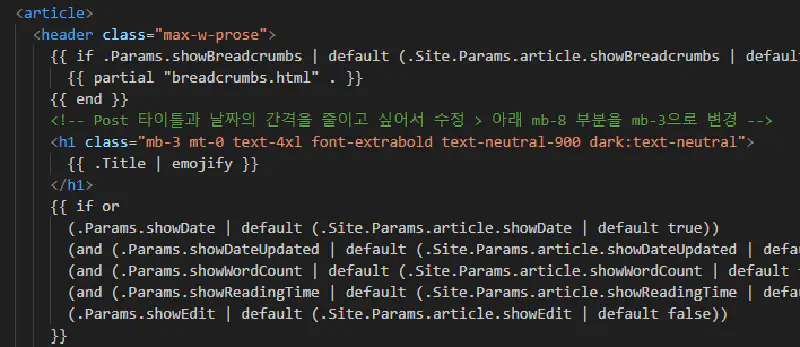
While using Visual Studio Code, I noticed that yellow boxes would appear around Korean characters as I typed.
I tried to ignore it at first, but it became too distracting and significantly reduced readability. I finally decided to fix it once and for all.
The Cause#
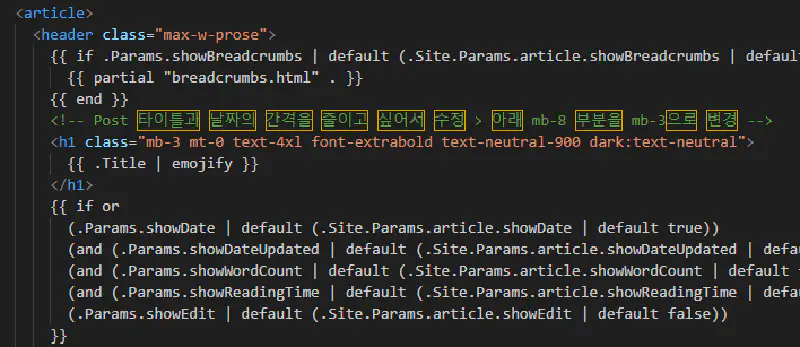
By default, VS Code has a setting enabled that highlights all characters outside the basic ASCII range.
The “basic ASCII” range refers to printable characters between U+0020 and U+007E. Since Korean characters are Unicode characters that fall outside this range, VS Code flags them with a yellow highlight.
While this feature is intended to be helpful for security (identifying invisible or confusing characters) and debugging, it is quite inconvenient for those of us who frequently type in Korean.
The Solution#
Open
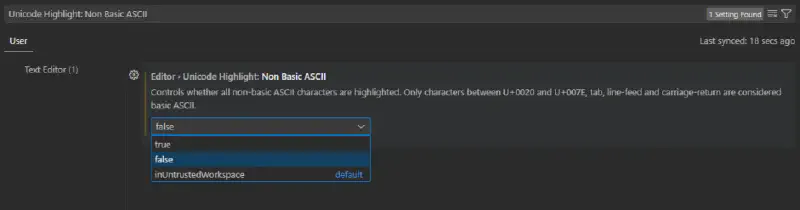
SettingsinVS Codeby pressingCtrl + ,.Search for
Unicode Highlight: Non Basic ASCIIin the search bar.
Unicode Highlight: Non Basic ASCII

Controls whether all non-basic ASCII characters are highlighted.
Only characters between U+0020 and U+007E, tab, line-feed and carriage-return are considered basic ASCII.- Set this option to
False(uncheck the box).
- Return to your code editor and verify that the yellow boxes are gone.