

For about 10 months, I used both Todoist and TickTick as a paid subscriber to compare them from a real-world perspective.
I had been a Todoist user for years, but when they removed two-way synchronization with Google Calendar last year, I started looking for alternatives. While both are highly polished task managers, their strengths and weaknesses are quite distinct depending on your usage patterns.
Instead of just listing features, I’ve organized this review around the actual differences I felt while using them daily.
Todoist#
Pros#
Clean and Intuitive Design
The overall use of whitespace and color is stable, making the structure easy to understand even for first-time users.High-Quality Korean Support
There is almost no friction in typing, searching, or displaying Korean text.Powerful Natural Language Processing (NLP)
For example, typingDo XXX from today until tomorrowaccurately recognizes the dates and duration.
Since TickTick struggles with this or requires manual entry, Todoist is the clear winner in NLP.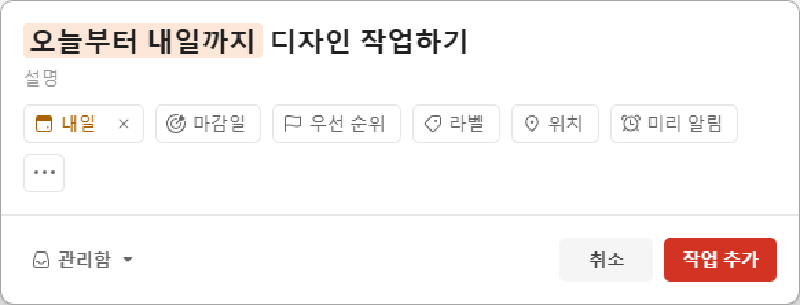
Cons#
Lacking Calendar View (The Biggest Downside)
- Cannot view Google Calendar events alongside tasks.
- No color-coding by project when viewing multiple projects in one calendar, making them hard to distinguish.
- The view toggle is inefficient (you have to cycle through List/Board/Calendar instead of just switching between List and Calendar).
- No shortcuts to switch between weekly and monthly views.
No 2-Way Google Calendar Sync
While it was possible in the past, it is now limited to a one-way view (Todoist → Google Calendar), meaning data sovereignty remains solely with Todoist.Relatively High Price
The price hike feels significant given the features. It’s especially disappointing considering the removal of two-way Google Calendar sync.No Shortcut Customization
The shortcut system is fixed and cannot be adjusted to fit a personal workflow.Windows App UI Bugs
The app window frequently opens off-screen after a PC reboot.
This is actually why I wrote the post: 3 Ways to Recover a Program Window That Disappeared Off-ScreenInconvenient Search for Completed Tasks
Completed tasks are excluded from basic searches; you have to click a separate “Search completed tasks” button to find them.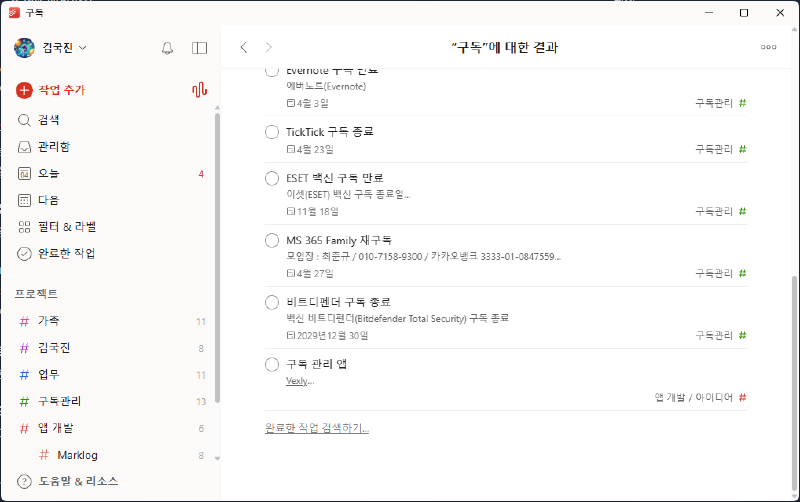
Slow Feedback
Responses to bug reports or feature requests are almost non-existent or very delayed.
TickTick#
Pros#
Full 2-Way Google Calendar Sync
Edits made in either TickTick or Google Calendar are reflected instantly on both sides.Intuitive Default Shortcuts
Ctrl + 1: List ViewCtrl + 2: Calendar View
Customizable Shortcuts
You can set your own shortcuts for priorities, moving tasks, and switching views.Powerful Calendar View
- View all projects and subscribed Google Calendars on a single screen.
- Extremely easy to track schedules by day, week, or month.
Rich Extra Features
Includes optional tools like the Eisenhower Matrix, Pomodoro timer, and desktop widgets.Fast Feedback
You receive quick responses to bug reports or feature requests, at least acknowledging that the issue has been identified.
Cons#
Korean Input Bug on Windows (Fatal Flaw)
Likely an IME-related issue, Korean typing does not work correctly on the Windows desktop app. (Web and Android are fine).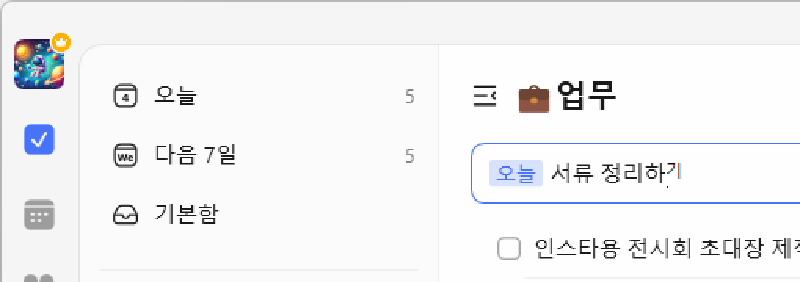
Cluttered Design
While it provides a lot of information at a glance, the lack of whitespace and color choices can make the UI feel messy.
Brief Summary of Other Apps#
Microsoft To Do
No calendar view, no NLP. Good for simple chores or basic personal task management.Any.do Korean input/search and UI feel a bit clunky, but it’s generally okay.
Todomate
Great for Korean users, but lacks NLP and has a weak calendar. Good for families, but poor for external calendar integration.Notion
Possible to manage schedules, but the app is heavy and feels like “too much” for a dedicated task manager.
Conclusion#
Currently, my decision boils down to two factors:
- Calendar usability (UI, shortcuts, etc.)
- Korean UI and input experience
While TickTick is overwhelmingly superior in its calendar features, the Korean input bug on Windows is a dealbreaker for me since I spend so much time actually typing.
Ultimately, I chose Todoist due to the superior input experience and am likely to renew my subscription. If Todoist improves its calendar view even just a little, I would choose it without a second thought, regardless of the price.
In the end, the best task manager isn’t the one with the most features, but the one that fits your specific workflow most seamlessly.